For years, react-localize powered our dashboard. It served us well. Built something real. But systems age—maintenance became a nightmare, new features felt like fighting the codebase, and scaling globally? Forget about it.
The system needed revival.
Here's the thing: you can't just rip out a legacy system and hope for the best. Our dashboard runs 24/7 for thousands of customers. One broken translation = lost bookings, frustrated users, lost trust.
So the challenge wasn't replacing old code. It was resurrecting it without anyone noticing. No pressure. 😅
How We Revived It: The Resurrection Roadmap 🗺️
Phase 1: Laying New Foundations 🏗️
We didn't rip out the old system. Installed i18next alongside react-localize instead. Built a new foundation while the old one still carried the weight. Parallel > risky swaps.
Phase 2: Testing the New DNA 🧪
Dropped i18next into a few non-critical components. Real users, real feedback. Way better than theory and checklists. Proved the new system could actually handle what we were asking of it.
Phase 3: Gradual Transformation 🐢
Component by component. Deliberate. Boring. Perfect. Legacy systems don't fail from one bad decision—they fail because change moves too fast. We learned that lesson. Moved at the speed of trust.
Phase 4: Retirement and Rebirth 🎯
Once 100% stable, we retired react-localize. Gave it a proper send-off. In came i18next. Modern. Scalable. Ready for what's next.
What Legacy System Modernization Actually Teaches You 💭
Respect the Foundation: React-localize didn't fail. It aged. There's a difference. The best modernizations honor what came before while building toward what's next. We didn't trash it—we learned from it, then surpassed it. 🙏
Move at the Speed of Trust: We could've ripped it all out in a week. Took 6 weeks instead. That extra time? Worth every second. Legacy systems carry weight—customer trust, history, unknowns. Move faster than that and it snaps. 💔
Customer-First, Always: Every decision came down to one question: does this break someone's booking? If maybe—we slowed down. Not paranoia. Respect. That's it. ✅
The Real Win 🏆
Modernizing a legacy system isn't about the shiny new tech. It's about leadership choosing respect over recklessness, longevity over speed, and evolution over extinction.
React-localize had a good run. Built something real. But systems are living things—they need to grow or they die. Our platform wasn't just upgraded. It was revived. Stronger. More resilient. Ready for the next 5+ years of global growth.
That's what happens when you treat legacy systems not as tech debt, but as inherited responsibility.
If you're modernizing a legacy system right now, I want to hear it. What's keeping you up at night? What would you do differently? 👇
While working in office it is some times very important to convert our documents into pdf format.With this post i am presenting very easy method to convert any MS office document or image into pdf format using software PdfCreator . It is opensource also.
Edit:Edit: (Seriously, who the hell underlines the text nowadays)
[In case you're clueless, spend time thinking how to enlarge the image. Otherwise, calculate the millionth number that is not a perfect square or a perfect cube. jk ]
Yes, Microsoft Office can save files in PDF format. This was Office 2010, i know Office 2007 can do the same. Can't say about previous versions.
Perhaps the Dummies guide to use Keepvid. Referring to Youtube's Terms of service it does not clearly says but yeah, they don't want you playing around download videos since they are a streaming website. On the other hand, it is itself paradoxical. Because when we are seeing any video, it is being stored on the computer in the form of cache. Pretty much one can't distinguish downloading video from seeing it in the browser. Even though it would be good if you download only legal content, downloading copyrighted things which are itself uploading illegally is still a crime(just like downloading songs from pakistani website or using torrents to download movies) which is not advised.
Open Youtube.com and select your favorite video to play
Now select the URL and copy it. (right click and click copy).
Pretty interesting. A month from now i would be able to derive this time. Thanks to Physics, it is really an awesome thing, with real calculus it comes to life. And the best, all you need to have is Internet.
Academic Earth
Another good domain.Niche for every Lecture out there.
There are certainly more people who are teaching, like PatrickJMT, on the internet, keep trolling. Listen to Richard Feynman, some here & Stragely it is Microsoft, Project Tuva. Then the classic way in which Carl Sagan speaks, plenty of videos on youtube.
Talking about physics as a vocation, there are many more blogs out in the net yet i got specifically amazed by Starts with a Bang (not forgetting to mention, Yes, everytime someone sees the author's picture, 3 children die in Angola. He should change it).Ponderabout.com is also a great place. I don't stick to too many places, it gets real hard to read them everyone. At last Discovery News is a must in your RSS reader. [More Earth: Ten things you don’t know about the Earth]
First of all, Thanks to MrSaints. He told me about it.
I tried it, and it worked.
To see the bigger version. Right-Click on the image and click 'View Image'.
Some minutes later i was here,
This is hilarious, though the last one does not makes sense. But had to add O in there so to display Canada in the translation. While you are trying this take care of uppercase and lowercase letters it does makes difference.
Dictionaries is the home of words. The list is according to their awesomeness, the most awesome one is at last. Although, i'm pretty sure you will have to try each one of them. The list contains two software, i had been partial choosing the list as Mac and Linux users already enjoy in-built dictionaries and the poor windows users has to download one. No otiose crap, every element is different.
Wordweb
It is a software, a lightweight software that runs in the system tray. To look for meaning of a word, select the word, then Ctrl+Alt+W or Ctrl+Click the word. The small dictionary pop-ups and magically shows the meaning. I was previously using Wordweb pro version 4, it was all i needed but had no support for google chrome so had to upgrade to version 6 free version.
Onelook
It is the meaning of internet. In a true sense, i use it as a word finder. Use operators to find new words that make sense to you. The website is suffice to understand the importance of it.
Urban Dictionary
Things get short, internet has provided a boost to english as a language. It is dictionary by people. That's the reason that every word ever spoken in the backwaters of this planet is even in this thing.The old fun: Try seaching the your name in it, you will be fascinated. If not, then just add a new definition!
Google Dictionary
Yes, google even has a dictionary. It shows quotes that were in news in the recent past. Below the usage examples it displays some links to other dictionaries also. I use it for the defining the word in simple language. As you can see in the screen shot, it is a multi-lingual dictionary. Every widely spoken language is included.
Visual Thesaurus
I'm sorry but it is the only one not free. That was also the reason i didn't wanted to include this but It is the dictionary for fun. If style is what matters to you, it is one of those softwares on your computer that you want to show to the world. Not quite popular however best of it's kind. Try this free online version/emulator of the dictionary, though the software is a lot more cool. Each branch with different color represent a different thing. That wow thing. It is also available for Apple users. Cost: $40
Simply vacuous fun.
I strongly think that if i had to pick any one of them, breaking the rules, i would choose the in-built dictionary of Mac as the best one.
Update: Google Chrome Extension
I noticed that there is a google chrome extension called Google Dictionary, since most of us need it when on web, it can be quite a handy tool.
Ubiquity
Wikipedia is neutrality is amazing. I too want to be neutral, a Google chrome extension means another add of Firefox one. You will find many dictionary addons on Firefox, but no one has that aura. Ubiquity is not really a dictionary, it is much more that that. Aza Raskin started this lab experiment it had to be great. To get the definition select the word on page press Ctrl+Space, in the interface that comes on type define. Here is the video by himself explaining it all.
Not much days ago, Twitter warned users of a phishing attempt. After clicking the infected link, they landed on a login page that was indistinguishable in terms of design from the original twitter login. After you gave your credentials, it redirected you to twitter home page(as you were never logged out). It was though a simple idea, many fell for it. Thus, hacked(err.. Technically 'Cracked' ).
Anyway, it's the most real trick. The villain can get your password, without a try, and you are giving it to him. No offense, but it a truth universally acknowledged that few of :) people on Social Networking sites are nincompoops. Hence, easy targets.
They fall for tricks like phishing. As it is, not quite difficult, find a free host and make the page look like login page of say twitter. Now what you have to do is, to get somebody visit the link. In the optimistic world, it'll be quite good if you even got login credentials of 1% of users visited.
Well.. that was easy. There is quite high chance you already know about this. wait, there is something more.
Tabnabbing aka tabnapping!?
First of all, tabnapping?? the name is crazy. still getting used over the web now.This is the latest and the most intelligent one. You visit the page of bad guy, it's normal and informative now. With many more tabs open, the site of bad guy loses focus. Thanks to Javascript he detects it and changes his page's favicon and content to that of Gmail.com. You return to the tab, thinking you need to login, thus enter your credentials. All done. Again, this is Aza Raskin!
But, wait a second, are we so stupid to not remember we have gmail login open? maybe not this time, you can't be attentive every time! Hugely inspired by traditional phishing, they'll redirect you to the original page once you've entered the information(no matter right or wrong!). Obviously, you were never logged out. There is a creepy presentation Aza Raskin has on his page. Goto the link, after the page has loaded. get busy with another tab, after at least 5 seconds come back. Whoa! it has Gmail icon and whole page looks like that. Aza says, he was too lazy so he rather just showed the screenshot of gmail login. You get the idea it is possible.
Preventing Phishing
Not getting into what needs to be done with browsers, although the very complexities. It is a normal phishing attempt, just keep your eye on the URL. When logging into great things.
Any mis-spells, additional suspicious domain are the signs of phishing. and particularly avoid using full-screen mode of browsers while you login to any service.
One of the more secure thing is to make firefox remember your password, so whenever there is a login prompt firefox will fill it for you. In case it didn't, you'ld get some instinct or suspicion that the site's not right.
Desktop Phishing
Now this defines awesome. The bad guy can get your username password even if you are on the right page. That is you login from the right page like http://www.twitter.com/login still you are falling for the trick!
How? See the video.
Note:Ok you googled it now? You will not find much about it. I am not big enough to interpret what is going on behind the scenes. But surely it has to do with security, normal bugs to be public is not a huge thing. Since, the potential of so called 'Desktop Phishing'. It is scary and without a cure today, that might be a reason why it is not something you have heard of.
So what he did is, he modified a system file that operates the TCP/IP protocol. How he modified it is even more simpler, compressed the file to be modified in sfx extention(it will extract itself). Obviously you won't start it anyway, so it is along with a legit software like teamviewer. Now every time the victim visited paypal.com, he is actually visiting the fake paypal page from the bad guy. The login button does nothing but saves your credentials in some file. Every noob in the cyber cafe at the corner of the road can do this.
Even more than that, imagine it's use on public computers. The computer owner may himself modify the file. Every one opening http://www.facebook.com for instance will first fall on his clone, after giving the credentials he can be redirected to the original facebook login which can lessen the suspicion of the user to a great extent.
How to prevent from this thing?!!
The only solution is to, use only official and trusted websites for downloading any piece of executable code or file. The way it is extracted and the type of file it is, no Anti-virus will warn you. Actually, no will know.
To the threat to public computers, i'm still unable to find a cure there. Comment if you do not agree! Surely, Desktop Phishing is the best way to 'phish'.
You don't need to be paranoid here. There is someone claiming that they'll alert you whenever the HOSTS file is edited, try inquiring about it.I'm not sure of its credibility.
How Secure is your Browser?
In most cases, we think Firefox is a reliable browser(It is, even Chrome Safari and IE are pretty much. No browser treats your privacy like facebook does.). It'll warn us, on many sites it does. But.. the speed and ease you can register a new domain(especially free ones) it is impossible for a browser to stay up to date with the amazingly new ways hackers find to bypass security. In real world, it never matters that Firefox saved you 100 times from phishing, still for the only time you are 'cracked' the loss is no less.
Here Gercek Karakus tells you how open you are when on web. Similar example StartPanic!
If they still seem a low threat, imagine a phisher who first knows which service do you use on the computer, and then present you the login page of same service. You'll not be able protect yourself every-time. or someone who first knows which bank you use then present you their login screen saying "Your login has expired!" which is normally what they show.
I'm sorry if you've freaked out. But that is windows. :P
Download Virtualbox, and install Ubutnu on it. For more information, here is Tutorial. Once you get used to things in Ubutnu, you can prepare for dual boot. Linux are the safest systems out there and FREE too! FYI I don't belong among those Free and Open source software(FOSS) junkies, rather i think the energy they waste hating windows could have been better utilized if they wrote few good pieces of code for *nix. In a nutshell, windows is your native OS, keep it. But don't be blind to the world outside.
Internet is awesome technology but not at the cost of intrusion of user's privacy. Stay safe.
If you have error or not, it's though exactly a diagnose. Using DNS server can speed up your online experience. Give them a try, it costs nothing. It can be all good and no bad.
DNS is Domain Name System, it's work in simple words is to translate URLs into IP addresses so that you can get the right thing. If it gets overloaded, you may be unable to view all or some websites. Like, if websites like http://74.125.53.99/ loads but http://www.google.com doesn't, you may have a DNS problem.
Also, if you have a DNS problem, the browser will often display error as Server not found.
To correct the trouble, you can use DNS servers. These will be servers that shall respond and process the DNS demands of your computer or network.
Some Gyaan Before we take off:
There are two types of the IP address your computer could be assigned.
Static IP
Your IP address would be same every time you connect to the internet
Dynamic IP
Your computer would be assigned different IP address every time you connect to the internet. In this case, it's good for you. You don't need to see Control panel for now.
There is a simple observation you can make just now, go and check whatismyip.org. The website shows your IP address(that's all it shows on the page, so i don't need to elaborate). Note it somewhere on notepad, paper or desk or in the form of doodle or on walls or have a Tattoo whatever. Now next time, you start the computer and connect to the internet, go again to whatismyip.org, again you'll find the IP address. Check the latest one from the one you noted before. If there's no difference then you have Static IP otherwise you have a Dynamic IP.
Here's the procedure.
The thing is you have to get to your internet connection's properties to instruct it to use a DNS server.
On Windows XP and older versions, it's in Control Panel - Network Connections
Or it can be in the Start Menu - Connect to
Right click your connection and get to it's Properties. (On Windows 7 or Vista, get straight to the properties of the connection)
Networking Tab - in the list of services, Click Internet Protocol (TCP/IP)
Get to it's Properties. You should see this.
You see those boxes for IP addresses, here is your turn to pick up the most handsome numbers from the menu below.
Here's List of DNS Server's that you do the Job, just for free.
Google Public DNS Google is everywhere. It claims to be the fastest, and i'm sure you would believe it unless you really want to investigate. If time's not a luxury for you, try Namebench. You will find other info there. So back on Google.
[Lifehacker] Everybody's got an opinion on how to keep a Windows system running fast and smooth. Some tips are timeless, others are bunk that always recirculate. Here's a closer look at what really helps and hurts your Windows PC. First up, here's the quick chart version, with the tips you're likely to hear floating around the net and from the mouths of casual IT types; each tip is plotted by its reputation and actual value. (More details for how we assigned these values below.) Click the image for a larger view. And now a little finer explanation on those points.
Seems Bad, Is Good
These are those tips that seem like they actually kind of suck, but are in reality pretty good for your system. Sleeping/Hibernating Instead of Shutting Down: Knowing that your laptop is drawing even just a trickle of power can freak out anyone who's had to pay for an expensive battery replacement, so a lot of people think it's always better to shut down your system when you're not using it. If we're talking PCs, the answer to the question of sleep or shutdown depends on how you feel about your electricity bill. For laptops, the issue of battery life and convenience is a sticky wicket. It takes some time and some vigorous hardware use to boot up your system, so if you know you're only stepping away from your system for, say, less than 3 hours, go ahead and close the lid and suspend it, or hibernate your system if you find it faster starting up. If you're going to be away for a solid bit, shut it down. Either way, don't plug it in if you don't have to, and spend more time getting things done than micro-managing your modern battery.
PRODUCT WARNINGS Dumb and Funny Warning Labels On Products
Liquid Plummer
Warning: Do not reuse the bottle to store beverages.
Windex
Do not spray in eyes. Bowl Fresh
Safe to use around pets and children, although it is not recommended that either be permitted to drink from toilet.
Toilet Plunger
Caution: Do not use near power lines.
Dremel Electric Rotary Tool
This product not intended for use as a dental drill.
Arm & Hammer Scoopable Cat Litter
Safe to use around pets.
Endust Duster
This product is not defined as flammable by the Consumer Products Safety Commision Regulations. However, this product can be ignited under certain circumstances.
Baby Oil
Keep out of reach of children
Little Ones Baby Lotion
Keep away from children
Hair Coloring
Do not use as an ice cream topping.
Wet-Nap
Directions: Tear open packet and use.
Dial Soap
Directions: Use like regular soap. Stridex Foaming FaceWash
May contain foam.
Hairdryer: Do not use while taking a shower.
Old Spice Red Zone Deoderant
Use only on underarms. Zantac 75
Do not take if allergic to zantac.
Sleeping Pills
Warning: May cause Drowsiness Christmas Lights
Warning: For indoor or outdoor use only.
It is often people imagine a future where our human skills will be lost. We'll be life-forms around plethora of machines helping and regulating us. But while we are advancing towards future, it can be seen slightly. Here's two mind-blowing projects, i was honored to know about.
Sixth Sense
How nice a thought, draw a watch on the wrist and there's time. Make gesture of taking a picture and it it's taken. Like those Harry Potter movies, there is actually in real life videos in the newspaper. Latest status on boarding passes. Solving what should i buy problem. Dialing on the hand. Using paper as a digital medium, you can drag a graph or some paragraph from the paper to the digitally connected paper. Collaboration of this intimate technology is amazing.
It also looks the real version of Hollywood Movie, Minority Report.
It has become more clear that Twitter is going for an huge redesign project. Twitter designer Doug Bowman, made the progress available on web.
Though the Sneak Peek does not reveals much but certainly more stats. The background is apparently inspiration from the fruit stripe gum. While the awesome, new design is in the public eye. It isn't finalized. The activity of twitter designers was recently seen as twitter adopted the new welcome page.
Twitter recently proposed a new home page design that is out now.
Mozilla labs experiment, it has lots of nifty features and can be embedded in any web project just by adding two files in the header. In order to use, sign-up is required.
No wonder a brilliant online code editor, and best among the list. Though registration is not required for use, sign-in activates advanced features like collaborative work etc. Offers all the features that a code editor should. Supports most programming language.
It started with a bet. While stumbling through that image website, i noticed a really cool picture(skateboarding Fly!), it was protected, and if you right click and click save as. They'll will in turn save a GIF file named spaceball of 1x1 pixel resolution. The same applies for every protected picture.
I wanted to save it on my disk but it won't allow me to save it directly. Here's how to save them.
It would be intrusive if i gave link to any protected picture. So when you find one.
As a line of text is selected, select the image(Drag the mouse from free space aside picture to the picture)
Right click the selection. In Firefox, click view selection source, a windows DOM source of selection would appear.
Go through the small piece of code, for convenience select Wrap long lines from the view menu. Identify the long and distinguished image URL and paste it on address bar
Now you can save it.
It's normal stuff, most of you would have eventually known it. Alas, thanks for the visit.
How many times has something as simple as deleting an empty folder wasted your time? Windows file management has progressed much since the old days of MS-DOS, but it’s still far from perfect. Many times when you manage your computer hard disk drives or move files and folders, you end up having empty folders. This situation also happens when you uninstall programs. Although these empty folders do not take up any space, it still is annoying if you are searching for some file. In this post I decide to give some alternatives to make your task easy.
There are two Freeware tools (which i like most) for deleting empty folders
1.RED (Remove Empty Directory)
Type: Freeware & open source
About: RED searches and deletes empty directories recursively below a given start folder and shows the result in a well arranged tree. Further you can create some custom rules for keeping and deleting folders. Empty files in directories can also be ignored. Just try RED to see the other features - no registry keys or system files will be touched.
Hey People, I just noticed that most of the visitors here, don't look to be aware of the Feature that actually you can chat on the Website without any registeration, there at the lower right corner of the Page, you can see a small box. There it's firefly, i already had given it's review here it's good. A thing, i would not be blogging for a year now, School things i'm in 10th class(Grade) and that's a important class so just a hibernation. In the meantime, Enjoy the Posts, i'll obviously not be away from the internet, i'll keep reading comments and replying. I am still a Newbie in this world so will be even learn some stuffs, and please if you can recommend even any obvious stuff, Share! mail me, my inbox shailendra.paliwal@rocketmail.com needs it. I have so much problems on the site and thus can't solve them, let me know that you can solve them. I had so much thoughts to write about in the post, i just ran out of them Super speedy thoughts. And Please Comment, you don't know, it feels so good to see "someone" saw the work. My Google Profile
You have been using those Chat clients, everyone uses them, Gtalk, Y!Messenger, Live Messenger, AIM, ICQ there are too many more. Now, it's so difficult with RAM space, for some even HD, or just handling 4 IM clients. and then different extensions for Twitter, or visit Facebook every time, or just to check mails.
Today, I’m going to put in my own plug for Digsby, an application I use every day, by showing you six things Digsby can do that will save you time, energy, and RAM space.
Digsby has come to replace my use of several other applications – no longer do I need a Gmail window, Twitter window, Facebook window, and IM window open all at the same time. Instead, I just use Digsby!
Now this is awesomest of the coolest IM clients there, previously there was Pidgin, but it does not had that, Graphics, UI. And Digsby, now it looks really great, even sooo simple! and works for Windows, Linux and even Mac OSX.
Firefox strikes again, this time with a new version 3.5, a bit fresh logo and some more cool features. No need to tell how new is HTML5, firefox this time has got the experimental support with HTML5.
It has some greatest features to what firefox is known for, let's see some of them. 1. Videos with HTML5
If you're viewing a page coded in HTML 5 with video in an open-source format like Ogg Vorbis or Theora, Firefox 3.5 treats that video like it's just part of the page, not a separate little island of Flash content. That means instant commenting on videos. It could also mean offering links from inside a tutorial video that offer more details on what's being shown—soldering tips on an iPhone repair guide would be keen. In general, it's just a promising step forward into a seamless melding of video and text on a future web.
2. Javascript Engine, TraceMonkey
As Mozzila Said, some Months ago, about in-development Javascript Engine, Tracemonkey is "20 to 30 Times faster" than the old Spidermonkey in Firefox. Even if TraceMonkey is ultimately outpaced by Chrome and/or Safari, its innovations push the whole browser market forward and give us all a bit less load time to complain about.
3. Geo Location
If you type post office into a maps site, you probably don't want the headquarters of the U.S. Post Office, or post office listings from two towns over. Integrated geo-location, powered by Google's Wi-Fi triangulation and simple IP address information, looks to know roughly where you are and help you when you're looking for something local. You can disable it if you'd like, but, realistically, signing on from any IP address reveals a bit about where you are anyways. If a good number of sites pick it up, geo-location could bring to the browser what a lot of people are already enjoying on their phone.
4. Improved Session Restore
Firefox even features a crash recovery tool, for smarter Session Restore, It'ld allow user to select the tabs to load get back.
The feature enables user to drag a tab to make a new browser window to it.
6. Undo closed Windows
The most precious, previously firefox got the ability to restore previously closed tabs, this time a much necessary feature restoring of Closed windows is also there. The feature should also restore the text you typed into it. It can be found in History menu, named Recently Closed Tabs.
7. Forget this Site
There are addons for Private Browsing, but would be nice to wipe a particular site off the History. Firefox 3.5 offers a convenient "Forget This Site" feature.
It doesn't cover subdomains, and your network traffic and Flash memory would still hold some details, but it's a handy tweak however you cut it.
8. Smart Keyword suggestion
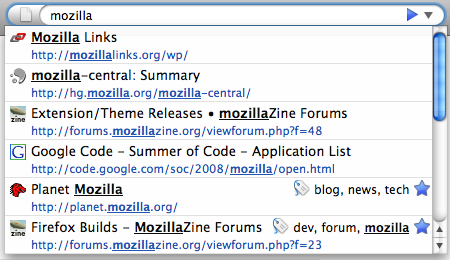
Firefox 3's AwesomeBar/address bar offers a speedy list of suggestions to complete whatever you're typing. That's great, but that list comes from your page history, bookmarks, and tags, and can be matched by URL or name, leaving some results almost uselessly cluttered. This gets fixed with special character filters in the next Firefox. Restrict a search by typing "life *" for just your bookmarks with the words "life" in them, or just your tagged "lh" items with "lh +". Anything that really makes getting backs getting back to importantly web destinations quickly is a welcome upgrade.
9. Private Browsing Mode
Now, it should be there, like for Gift Buying, Sensitive research, for bill pay, accessng your friend's browser for a quick look to your emails. Likewise, anonymizing some of your searches and cookie collection on your own machine isn't a bad idea, and a private mode can do that too. You don't need it all the time, but you might be glad it's available.
10. Colors getting Real
Different cameras, monitors, and capture devices grab and set colors in different ways. On the web, most colors look the same, though, because they're filtered and optimized for quick viewing in every browser. Firefox 3.5 introduces dynamic color profiles for each picture, meaning that whatever the graphic designer or photographer saw when they were doing their work, you'll see it on their web page.
I would sincerly like to hear your words, please Comment.